
Toggl Track Review: Time Tracking That Teams Actually Use
Toggl Track Review: What It Is and Who It's For
Toggl Track is a time tracking platform built for freelancers, agencies, and teams that need to know exactly where their hours go — and turn that data into billing, profitability, and productivity insights. It was created by Toggl OÜ, a company headquartered in Tallinn, Estonia, and has grown into one of the most widely recommended time trackers on the market, used by tens of thousands of companies and millions of individual users.
The core idea is simple: start a timer with one click, assign the entry to a project or client, and let the reporting do the rest. Where Toggl Track separates itself is its refusal to become surveillance software. There are no screenshots, no keystroke logging, and no camera monitoring — the desktop app records app and website activity locally, and you decide which of those activities become time entries. That "track without spying" philosophy is a big reason it earns high adoption inside teams that resist more intrusive tools.
The service suits several distinct audiences. Solo freelancers use it to capture billable hours and understand their own work habits. Agencies and consultancies use it to bill clients accurately and spot unprofitable projects. Larger organizations use it for team-wide capacity planning, timesheet approvals, and financial reporting. The table below summarizes the essentials.
| Attribute | Detail |
|---|---|
| Website | toggl.com/track |
| Developer | Toggl OÜ (Tallinn, Estonia) |
| Launched | 2006 |
| Platforms | Web, Windows, macOS, Linux, iOS, Android, watchOS, browser extensions |
| Free plan / trial | Free plan for up to 5 users; 30-day Premium trial, no card required |
| Primary purpose | Time tracking, billing, and profitability reporting |
Is Toggl Track Safe and Legitimate?
Toggl Track is a legitimate, well-established product from a company that has operated since 2006 and self-funded its growth from the start. On the security side, it has invested heavily in independent verification rather than relying on marketing claims. The platform is ISO/IEC 27001:2022 certified and has completed a SOC 2 Type II attestation as of June 2026 — the more rigorous of the two SOC 2 tiers, since it validates that controls operate effectively over time rather than merely existing on paper.
Data protection is handled with encryption both in transit and at rest, using TLS 1.2 and AES-256. The service runs on Google Cloud Platform, and although the physical infrastructure sits in the United States, the cloud contract is governed by EU law through Google Cloud EMEA, with GDPR-aligned transfer safeguards. Toggl also states compliance with CCPA and CPRA and alignment with the EU Data Act. The security parameters that matter most for a vendor review are collected below.
| Security parameter | Detail |
|---|---|
| Certifications | ISO/IEC 27001:2022, SOC 2 Type II |
| Encryption | TLS 1.2 in transit, AES-256 at rest |
| Hosting | Google Cloud Platform, EU-governed contract |
| Compliance | GDPR, CCPA, CPRA, EU Data Act |
| Access controls | SSO via SAML 2.0, 2FA, passkeys, role-based permissions |
| Uptime | 99.99% availability target with regular backups |
| Monitoring | Third-party audits and penetration tests |
Reputation across major review platforms is strong. Toggl Track holds roughly 4.6 out of 5 on G2 and around 4.7 on Capterra, with reviewers repeatedly praising the clean interface, one-click timer, and reporting quality. Criticism tends to cluster around a few honest limitations rather than reliability problems: occasional sync hiccups on mobile, a learning curve for advanced permissions, and the fact that a workspace owner can enable two-factor authentication for their own account but cannot force it across every team member. For privacy-conscious teams, the absence of GPS and screenshot monitoring is a feature; for managers who want intensive oversight, it's a deliberate gap.
Toggl Track Features Worth Knowing
Toggl Track covers far more than a stopwatch, and its feature set is organized around three jobs: tracking time, analyzing it, and managing teams. The timer itself supports three input styles — run it live for real-time tracking, enter time manually after the fact, or log a duration without specifying exact start and end points. A calendar view lets you drag and resize time blocks, and Google or Outlook calendar events appear inside that view so meetings can be converted into entries.
The features that give the tool depth sit above basic tracking:
- Automatic activity tracking (Timeline): On Windows and macOS desktop apps, Toggl Track records apps and websites used for ten seconds or more. This data stays on your machine until you choose to turn it into a time entry, which fills gaps without surveilling anyone.
- Billing and profitability: Assign billable rates by workspace, team member, project, or task, then track revenue, labor cost, and profit at every level — project, client, member, and team.
- Reporting and exports: Build filtered, grouped reports in a few clicks, schedule them to arrive by email, or share them via public link. Reports export to PDF, CSV, or XLS, and invoices can be generated directly and pushed to QuickBooks.
- Project management layer: Project time estimates with budget alerts, fixed-fee projects, recurring project templates, and tasks as sub-projects help teams fight scope creep before it eats margin.
- Team governance: Timesheet approvals (including multi-layer flows), required fields for entries, an audit log, and access rights let admins keep data consistent across larger groups.
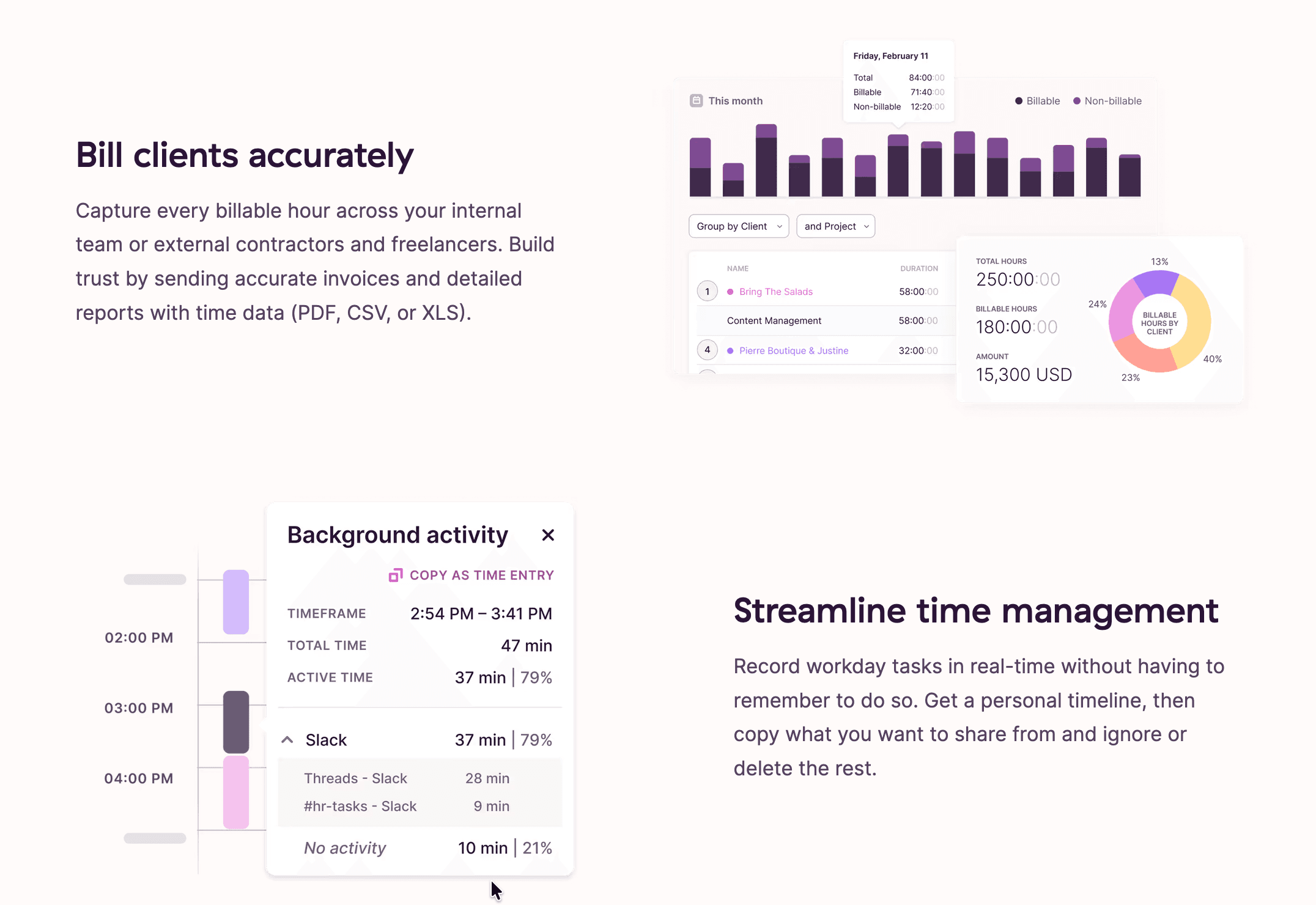
Reviewers consistently single out reporting as a highlight — the visual weekly project reports and billable-versus-non-billable breakdowns make it easy to see where effort actually goes. The main functional trade-off is that Toggl Track focuses on doing time tracking exceptionally well rather than trying to be a full project-management suite, so complex project workflows sometimes feel lighter than dedicated PM tools.
Toggl Track Pricing and Free Plan
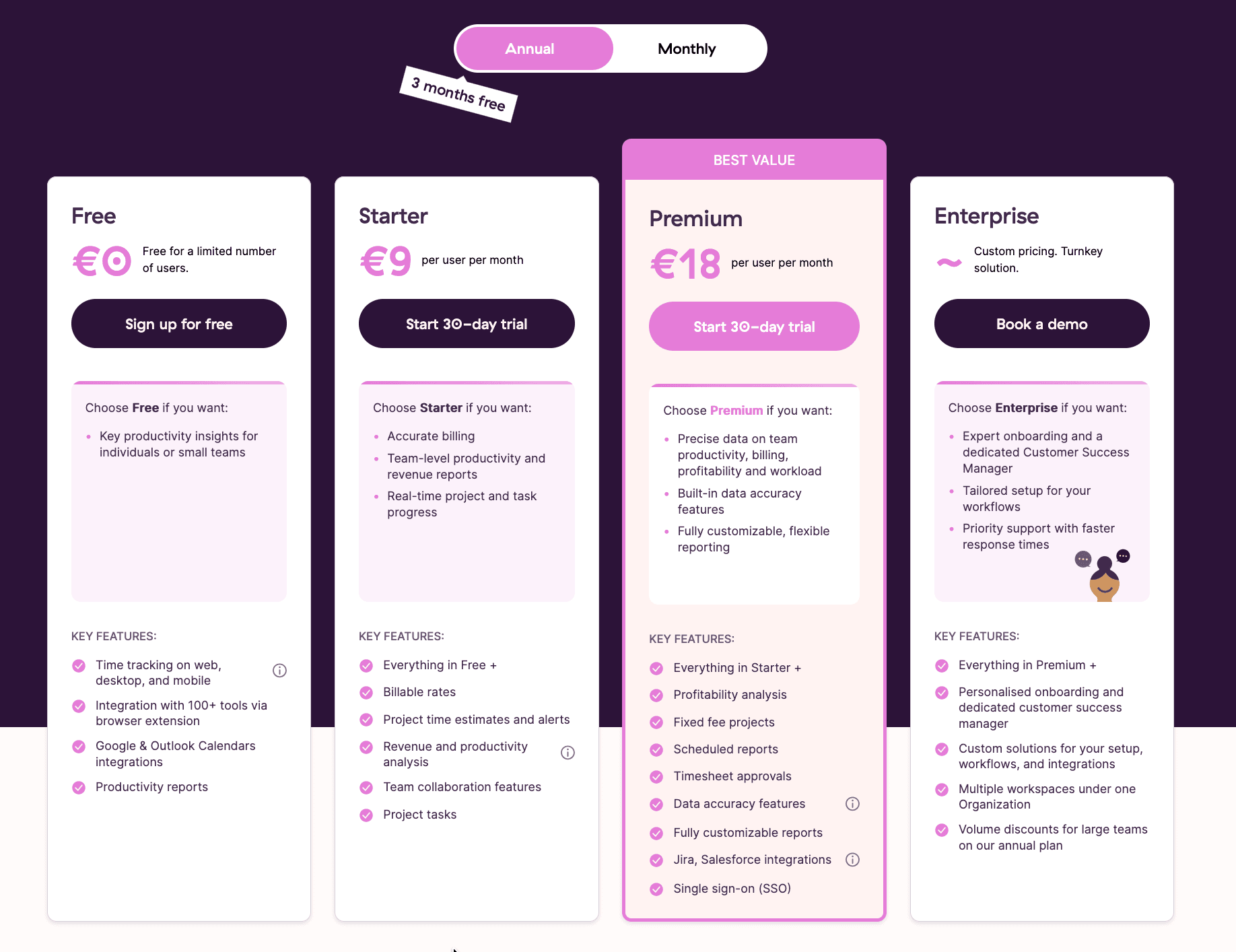
Toggl Track pricing follows a straightforward per-user model across four tiers: Free, Starter, Premium, and Enterprise. Annual billing shaves roughly 10% off the monthly rate, and every paid plan includes a 30-day trial of Premium features with no credit card required. The free plan is a genuine product, not a time-limited teaser — it supports up to five users indefinitely, which is why it's so often recommended to freelancers and small teams.
The dividing lines between tiers matter more than the headline numbers. Billable rates first appear on Starter, while profitability analysis, timesheet approvals, and single sign-on are gated behind Premium. Enterprise is negotiated case-by-case and unlocks capabilities that don't exist lower down, notably multiple workspaces under one organization and volume discounts for large teams.
| Plan | Price (per user/month, annual) | Best for | Key inclusions | Notable limits |
|---|---|---|---|---|
| Free | €0 (up to 5 users) | Individuals and small teams | Time tracking on web, desktop and mobile; 100+ integrations via extension; Google and Outlook calendar sync; productivity reports | Capped at 5 users; billable rates and advanced reports locked |
| Starter | €9 | Freelancers and small teams billing clients | Everything in Free, plus billable rates, project time estimates and alerts, revenue and productivity analysis, team collaboration, project tasks | No profitability analysis or approvals |
| Premium | €18 | Agencies and mid-market teams | Everything in Starter, plus profitability analysis, fixed-fee projects, scheduled reports, timesheet approvals, data accuracy tools, fully customizable reports, Jira and Salesforce integrations, SSO | Single workspace per organization |
| Enterprise | Custom | Large organizations | Everything in Premium, plus personalized onboarding, priority support, a dedicated Customer Success Manager, custom solutions, multiple workspaces under one organization, volume discounts | Pricing on request; demo for larger teams |
A cost detail worth planning for: subscriptions operate at the organization level, and Free, Starter, and Premium plans each include exactly one workspace. Teams that need several separate workspaces either create multiple organizations — each carrying its own subscription — or move up to Enterprise, where multiple workspaces consolidate under a single subscription and users appearing in more than one workspace are billed only once. For growing teams comparing the Toggl Track cost against a jump to Enterprise, that consolidation is often where the math shifts.
Integrations and API
Integration breadth is one of Toggl Track's strongest selling points. The browser extension embeds a Toggl timer directly into the interface of more than 100 web tools, so you can start tracking without leaving the app you're working in. Alongside those extension-based integrations, Toggl Track offers deeper native syncs and a public API for custom builds.
The native and most-used connections span the tools teams actually live in day to day:
- Project and issue tracking: Asana (import users, projects, and tasks), Jira (map projects, issues, and labels to Toggl projects, tasks, and tags), Trello, GitHub, and GitLab.
- Calendars: Google Calendar and Outlook events surface inside Toggl Track's calendar view; iCalendar is also supported.
- Communication: Slack, where you can start and stop timers and view timesheets without leaving the channel.
- Finance and CRM: QuickBooks for one-way invoice delivery, and Salesforce, which supports one-way sync plus two-way integration through the API.
- Automation: Zapier and Make connect Toggl Track to thousands of additional apps for custom workflows.
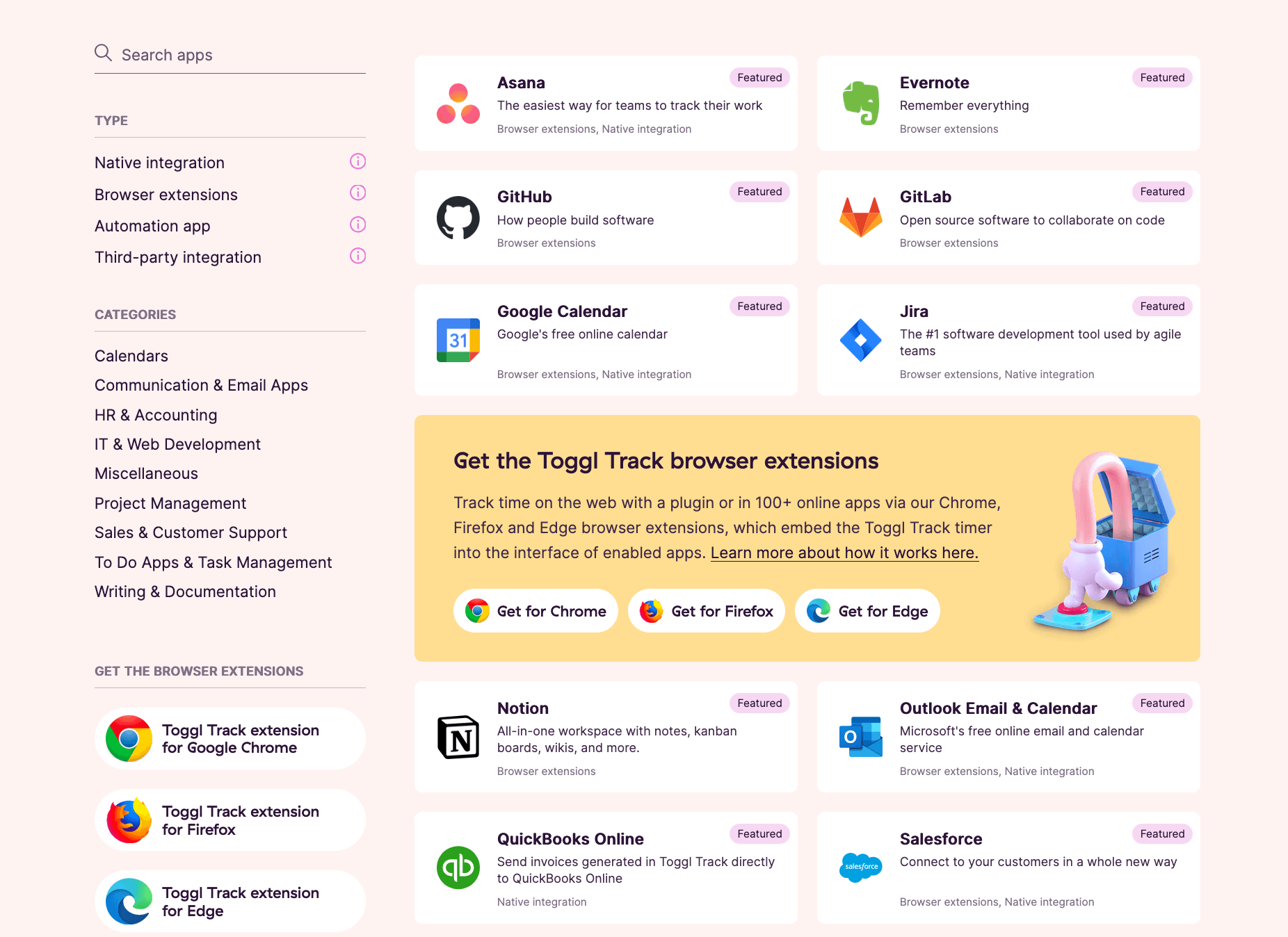
For developers, the Toggl Track API and webhooks make it possible to build custom reports, dashboards, or bespoke integrations, and the engineering documentation covers the endpoints in detail. One caveat worth flagging from the documentation: importing tasks (as opposed to just projects and users) from Asana requires a paid Toggl Track organization, and a handful of legacy integrations such as Basecamp 2 and FreshBooks are no longer supported.
Toggl Track Apps and Platforms
Toggl Track is genuinely cross-platform, and every app tier — including Free — has access to all of them. You can work in the browser, install native desktop apps for Windows, macOS, and Linux, run the mobile apps on iOS and Android, and even start timers from an Apple Watch. Entries sync automatically across devices, so a timer you start on your laptop can be stopped from your phone.
The desktop apps carry the most automation. They add the Timeline feature that records local app and website activity, idle detection that prompts you to keep or discard time when you step away, and quick controls from the macOS menu bar or Windows system tray. Automatic activity recording captures anything active for ten seconds or more, and all of it stays local to your machine rather than being shared with teammates. The mobile apps focus on tracking on the move — logging deskless hours, editing entries, and stopping a forgotten timer remotely. To download any of them, the safest route is the official Toggl Track site or your device's app store, which ensures you get the current version.
One documented limitation for Linux users: some reviewers note that the dedicated Linux desktop experience has seen reduced support over time, so Linux teams may lean more on the web app. Across platforms, the interface stays consistent and light, which is a recurring theme in user feedback.
Getting Started With Toggl Track
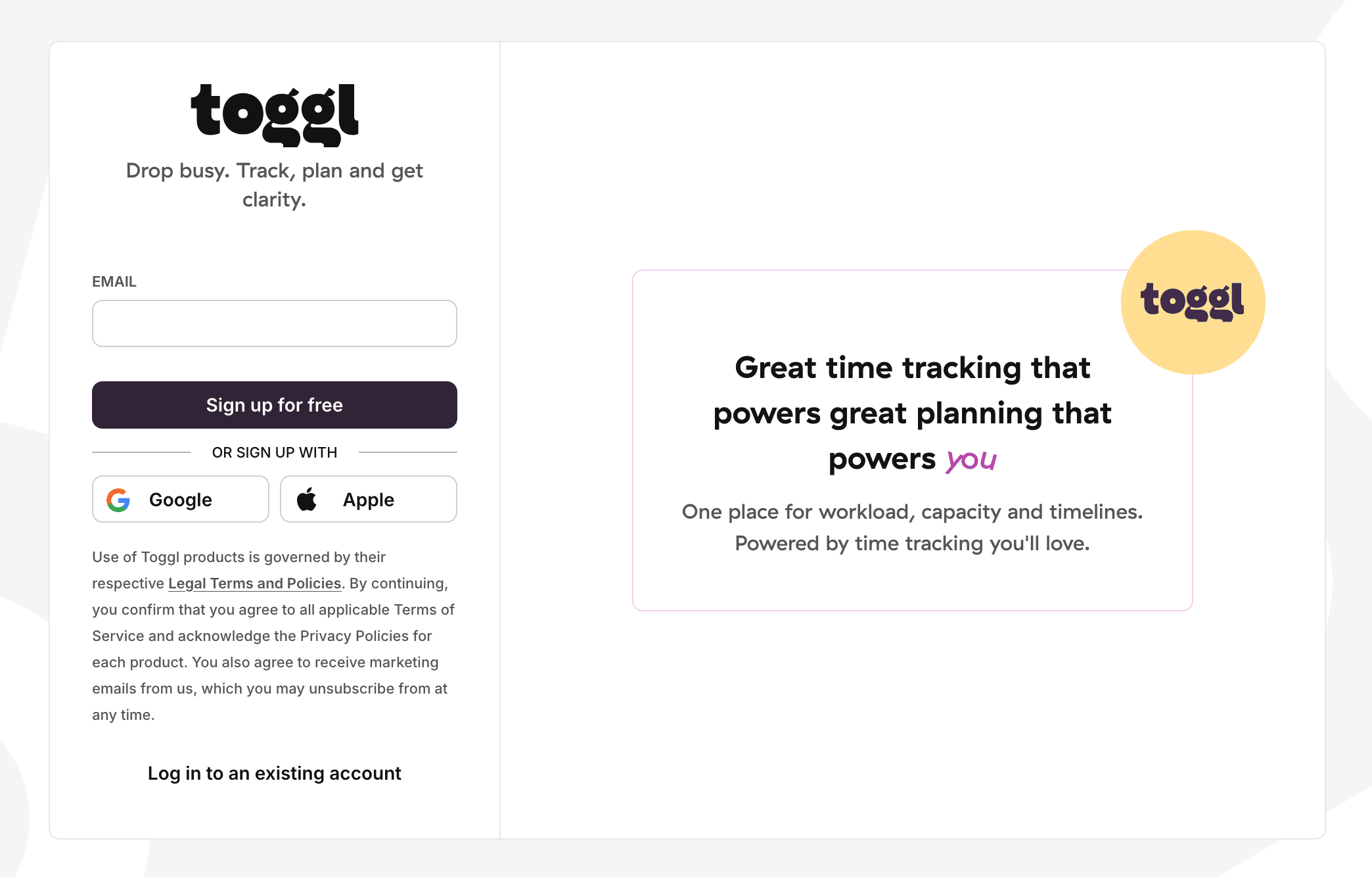
Signing up for Toggl Track takes a couple of minutes, and no credit card is needed to start on the free plan or the Premium trial. The flow is designed to get you tracking almost immediately, with an onboarding checklist that walks new users through workspace setup.
- Go to the Toggl Track sign-up page and enter your email, or choose to sign up with a Google or Apple account.
- Confirm your account and complete the short onboarding, where you can create your first projects or connect a calendar right away.
- Invite team members — up to five on the free plan — from the Team page.
- Set up projects, clients, and tags so entries are organized for reporting from day one.
- Start your first timer from the web app, desktop app, or browser extension, and review your data in the reports once time is logged.
Returning users complete the Toggl Track login with email and password, Google, Apple, or a passkey, and workspaces with SSO enabled can log in through their identity provider.
Support and Contact Options
Support is available to every user regardless of plan, which is not a given in this category. The team is distributed globally, so responses stay timely across time zones on weekdays, with slower turnaround on weekends. The channels and their characteristics are summarized below.
| Channel | Details |
|---|---|
| Live chat | Purple chat icon in the bottom-right of the web app and knowledge base |
| support@track.toggl.com; reply promised within 24 hours, median around 1 hour | |
| Help Center | Guides, tutorials, and FAQs covering setup, billing, integrations, and apps |
| Onboarding support | Dedicated onboarding and a Customer Success Manager on Enterprise |
| Developer support | Separate engineering documentation and support for API and webhook issues |
The support team operates without a formal SLA and assists only through email and the chat widget rather than by phone, but the fast median response time and plan-agnostic access are frequently cited positives. Higher tiers add priority queue placement, and Enterprise customers receive a named account manager for ongoing guidance.
Toggl Track Pros and Cons
Pros
- +Clean, intuitive interface with a fast one-click timer.
- +Quick team adoption thanks to minimal learning curve.
- +Strong, customizable reporting and analytics.
- +Works across web, desktop, mobile, plus offline tracking.
- +100+ integrations (Jira, Slack, Notion, Asana, GitHub).
Cons
- –Pricier than competitors like Clockify.
- –Free plan capped at 5 users.
Frequently Asked Questions
What is Toggl Track used for?
It's a time tracking platform for logging hours against projects and clients, then turning that data into billing, profitability, and productivity reports. Freelancers, agencies, and teams use it to bill accurately and understand where time goes.
Is there a genuinely free version?
Yes. The free plan supports up to five users with no time limit and no credit card, including time tracking across web, desktop, and mobile plus 100+ integrations. Paid features like billable rates and profitability reporting sit on higher tiers.
How much does the software cost?
Paid plans run €9 per user per month for Starter and €18 per user per month for Premium on annual billing, with about 10% off versus monthly. Enterprise is custom-quoted, and all paid tiers include a 30-day Premium trial.
Does the platform monitor employees with screenshots?
No. There are no screenshots, keystroke logging, or camera tracking. The desktop app records local activity that only you can turn into entries, which is a deliberate privacy-first design choice.
Which platforms are supported?
Web, Windows, macOS, Linux, iOS, Android, Apple Watch, and browser extensions for Chrome, Firefox, and Edge. Data syncs automatically across all of them.
Is Toggl Track secure?
It is ISO/IEC 27001:2022 certified and SOC 2 Type II attested, encrypts data in transit and at rest, hosts on Google Cloud under an EU-governed contract, and complies with GDPR, CCPA, and CPRA.
What can it integrate with?
More than 100 tools, including Asana, Jira, Trello, GitHub, Slack, Google Calendar, Outlook, QuickBooks, and Salesforce, plus Zapier, Make, and a public API for custom work.
How do I start using it?
Sign up with email, Google, or Apple, complete the short onboarding, create projects and invite your team, then start a timer from any device. No payment details are required to begin.