
Surfer Review: The AI Search Optimization Platform, Examined

What Surfer Is and Who It's For
Surfer is a content optimization and AI search visibility platform that helps marketers, SEO specialists, and agencies create content designed to rank in Google and get cited by AI assistants like ChatGPT, Gemini, and Perplexity. The core idea has stayed consistent since the tool launched: instead of guessing what search engines want, Surfer analyzes the pages already ranking for your target keyword — examining over 500 web and AI signals — and turns that analysis into concrete, real-time writing guidelines. This Surfer review looks at how the platform performs across features, pricing, security, integrations, and support, drawing on the company's own documentation and independent user feedback.
The platform reverse-engineers search results and scores your draft against top performers using its Content Score metric, a 0–100 benchmark that has become a common reference point in the content optimization category. What sets the current version apart is how tightly it ties traditional SEO to AI visibility. You can spot a gap where competitors are cited in AI answers and jump straight into the editor to fix the underlying content, all inside one workflow.
Surfer suits teams that write their own content and want a data-backed way to plan, optimize, and refresh it. It is less suited to anyone needing a full SEO suite, since it deliberately skips backlink analysis, technical site audits, and deep rank tracking. Businesses from solo creators to enterprises such as FedEx, Allianz, ClickUp, and ByteDance appear among its users, with the company citing more than 150,000 customers across 159 countries.
The table below summarizes the essentials.
| Attribute | Detail |
|---|---|
| Website | surferseo.com |
| Developer | Surfer Sp. z o.o. (Wrocław, Poland), part of Positive Group |
| Year launched | 2017 |
| Supported platforms | Web app; Chrome extensions for Google Docs and Keyword Surfer |
| Free plan / trial | No free trial; paid plans start a subscription with a money-back window via cancellation controls |
| Primary purpose | Content optimization and AI search visibility tracking |
| Languages | All languages supported (English strongest; weaker on some others) |
Is Surfer Safe and Legitimate?
Surfer is a well-established, legitimate product that has operated since 2017 and is used by major global brands. It was built in Wrocław, Poland, by founders Lucjan Suski, Michał Suski, and Tomasz Niezgoda, and in October 2025 it was acquired by Positive Group, a European marketing-technology company formerly known as Sarbacane Group. The founding team stayed on after the deal, and product development has continued at pace, with numerous features shipping in the months following the acquisition. Ownership by a larger European group brings more infrastructure and funding stability, though as with any acquisition, some long-term users watch for packaging and pricing changes.
On data handling, Surfer connects to sensitive accounts such as Google Search Console and various content management systems, so its privacy practices matter. The company publishes a privacy policy and terms (its "Regulations") governing how data is processed, and as a Poland-based company serving EU customers it operates under GDPR. Its parent group emphasizes European hosting and data sovereignty across its portfolio, and markets ISO 27001 certification at the group level. Prospective enterprise buyers who need a signed data processing agreement or specific certification scope for Surfer itself should confirm the details directly during procurement, since group-level claims do not automatically extend to every product.
Reputation is strong on formal review sites and more mixed in practitioner forums. The contrast is worth understanding before committing, and the parameters below give a quick read on trust signals.
| Security / trust parameter | Detail |
|---|---|
| Company transparency | Named legal entity, registered address, and VAT ID published |
| Regulatory framework | GDPR (EU); privacy policy and terms publicly available |
| Sign-in options | Email/password and Google Sign-In |
| Third-party ratings | G2 around 4.8/5, Capterra around 4.9/5, Trustpilot around 4.4/5 |
| Common praise | Ease of use, effective recommendations, responsive help resources |
| Common criticism | Price increases, credit limits, uneven human support in some cases |
Core Features and What They Actually Do
Surfer packages several tools around a single content workflow, and the depth of each is what separates it from lighter writing assistants. The Content Editor is the flagship. As you write, it scores your draft in real time against the pages currently ranking for your keyword and tells you which terms, headings, and structural elements to adjust. You can choose exactly which competitors to benchmark against rather than accepting Surfer's automatic selection, which gives experienced users useful control over the guidance.
Around the editor sits a set of features aimed at different stages of content work. Rather than a loose pile of tools, they connect into a loop from planning to publishing to refreshing.
- Surfy is the built-in AI writing assistant inside the editor. It rephrases, expands, and refines passages on command, and can adopt a defined brand voice. A newer agentic mode, Surfy Agent, can generate reports, optimize, and even publish at scale.
- Surfer AI generates full, SEO-ready draft articles from a keyword in minutes, pulling in relevant "People Also Ask" questions and producing commercially safe images. Reviews are positive on speed but note the output needs human review, and the feature carries a premium cost.
- Topical Map plans content clusters by analyzing a pillar topic or a connected Google Search Console account, showing which subtopics you cover and which gaps remain so you can build topical authority.
- Content Audit monitors published pages, flags ranking drops and content decay, and surfaces quick-win pages worth refreshing, each with a direct path into the editor.
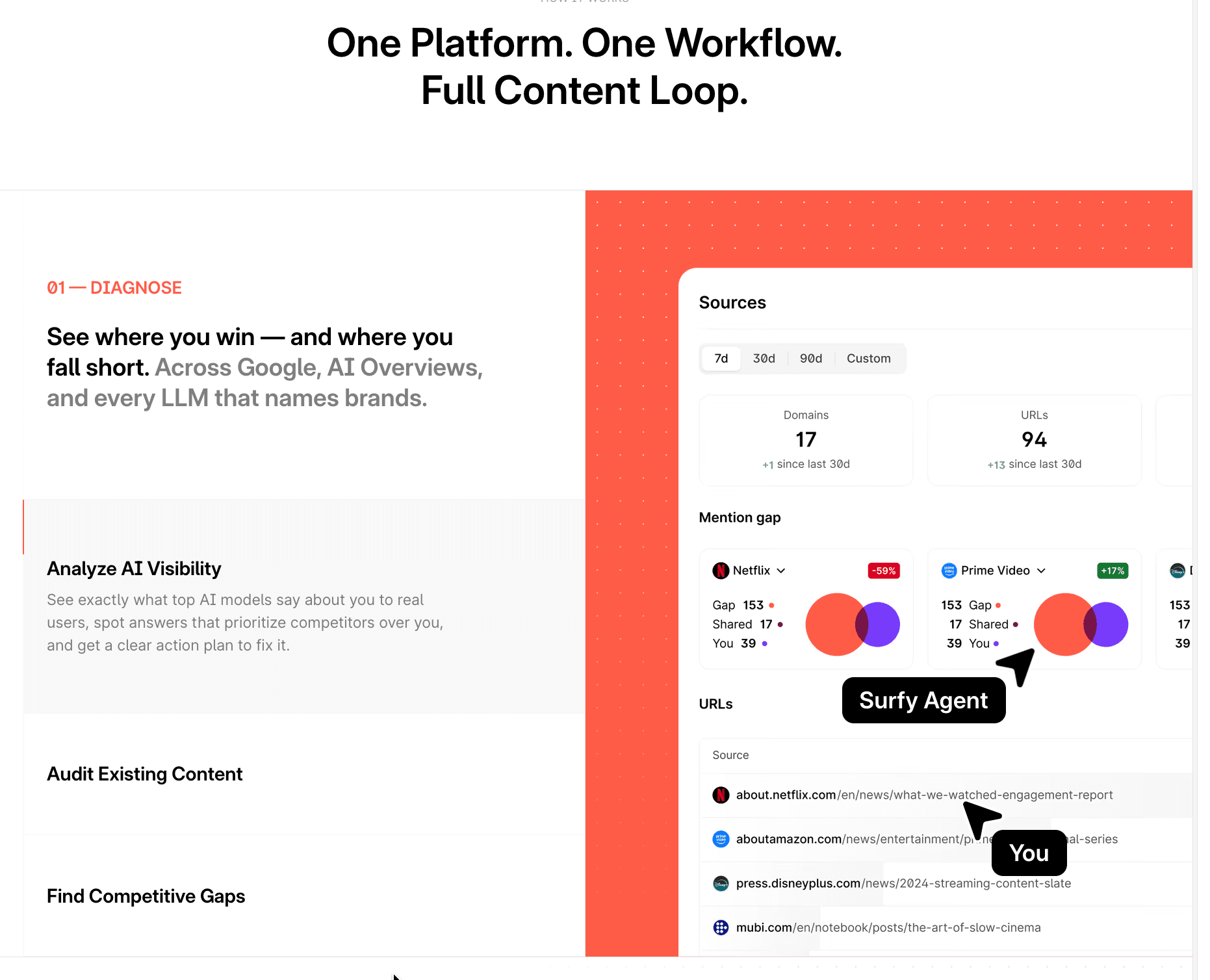
- AI Tracker monitors how your brand appears across ChatGPT, Google AI Overviews, Google AI Mode, Perplexity, and Gemini, reporting a Visibility Score, share of voice against competitors, mention gaps, sentiment, and top cited sources.
Two supporting utilities round things out: an AI Content Detector that flags machine-generated text and an AI Humanizer that rewrites it to read more naturally. Auto-Optimize can automatically weave in missing terms and sections to lift a Content Score, and one-click Internal Linking scans your domain to insert relevant links. A recurring caution in user feedback is that leaning on the score mechanically can push content toward keyword stuffing, so the recommendations work best as a guide rather than a rulebook.
Surfer Pricing and Plans
Surfer pricing is built around subscription tiers that differ mainly in how many documents you can create or optimize, how many pages and AI prompts you can track, how many brand workspaces and seats you get, and which advanced features unlock. All the headline prices below reflect the per-month rate when billed annually; monthly billing costs more, and the annual commitment is charged upfront for the full year. There is no free trial, though auto-renewal can be turned off at any time from the in-app billing page, and plans can be upgraded or downgraded whenever your needs change.
The three main plans cover most teams, with a lighter entry tier and a custom enterprise option on either end. The core distinction as you move up is scale and AI depth: higher tiers track more AI prompts, refresh them more often, add more workspaces and seats, and layer in advanced analysis.
| Plan | Price (billed yearly) | Documents | AI prompt tracking | Workspaces / seats | Notable inclusions |
|---|---|---|---|---|---|
| Discovery | €49/mo | 120/year | None | 1 / 1 | Optimization guidelines, Surfy, Humanizer, 10 pages tracked |
| Standard | €99/mo | 360/year | 25 prompts, weekly refresh (ChatGPT) | 1 / 3 | Brand Knowledge, Plagiarism Checker, 1-click optimization, Rank Drop Detection, 50 pages |
| Pro | €182/mo | 360/year | 50 prompts, daily refresh (all AI models) | 5 / 5 | Internal Linking, Content Ideas & Coverage Gap, Templates & Custom Voices, Cannibalization Report, 200 pages |
| Peace of Mind | €299/mo | Unlimited* | 100 prompts, daily refresh (all AI models) | Unlimited* / 10 | Advanced SERP Analysis, Personalized Onboarding, Dedicated Success Manager, API Access, 500 pages |
| Enterprise | Custom (from €999/mo) | Custom limits | Custom | Custom | SSO, enterprise security, white-label, priority support, legal onboarding |
A few conditions shape the real cost. The "Unlimited" documents and workspaces on higher tiers fall under a fair usage policy rather than being truly limitless. AI Tracker prompt allowances are one of the clearest reasons to move up a tier, since the entry plan tracks only ChatGPT weekly while Pro and above cover all five AI surfaces daily. Surfer AI generation and the AI Tracker can also involve credits or add-on costs, and several reviewers single out pricing and usage limits as the platform's weakest point, especially for freelancers and small teams. Payment is by credit or debit card, with bank transfer available for annual plans; PayPal is not supported.
Integrations and API
Surfer is designed to fit into an existing content stack rather than replace it, and its integrations focus on where writing and publishing actually happen. The Google Docs integration, delivered through a Chrome extension, overlays live optimization guidelines inside the document so writers never leave the editor they know. This is consistently one of the most praised parts of the product because it removes the copy-paste friction that derails many optimization workflows.
Beyond Google Docs, the platform connects to the tools content teams rely on for publishing and automation. The set is focused rather than sprawling, which keeps it reliable for the common cases.
| Integration | What it does |
|---|---|
| WordPress | Publish and optimize drafts directly to WordPress (Gutenberg editor) |
| Google Docs | Live Surfer guidelines inside Docs via Chrome extension |
| Contentful | View optimization guidelines while editing in a headless CMS |
| ChatGPT | Pull Content Editor guidelines into ChatGPT Canvas to tune AI drafts |
| Jasper | Keep Jasper-generated copy aligned with ranking guidelines |
| Zapier | Automate content workflows and connect Surfer to other apps |
| Keyword Surfer | Free Chrome extension for search volume and keyword ideas on Google |
For custom workflows, Surfer offers a REST API. Access is gated to the top "Peace of Mind" tier, the Enterprise plan, or a paid API add-on, and the documentation notes practical limits such as request rate caps that developers should plan around with retry logic. Teams also connect Surfer to Google Search Console to power Topical Map and audit features with their own performance data. More recently, Surfer added support for connecting through MCP, allowing its agentic Surfy Agent to plug into external stacks for research, generation, optimization, and reporting.
Platforms and Availability
Surfer runs entirely in the browser as a cloud application, so there is nothing to install to use the core product and it works across operating systems wherever you have a modern browser. There are no dedicated native desktop or mobile apps; instead, the browser experience is extended through Chrome extensions. The Google Docs extension brings live guidelines into your documents, and the free Keyword Surfer extension layers search volume and keyword data onto Google's results pages.
This browser-first approach means the full feature set — editor, audits, Topical Map, and AI Tracker — is reached through the web app regardless of device, though the interface is built with desktop work in mind given the density of data it presents. Publishing reaches beyond the browser through the WordPress and Contentful connections, so optimized content can move into your live CMS without manual transfer. For teams, collaboration happens inside the web app too, with live co-editing, comments, version history, and shareable external links that let clients or writers review work without a paid seat.
Getting Started with Surfer
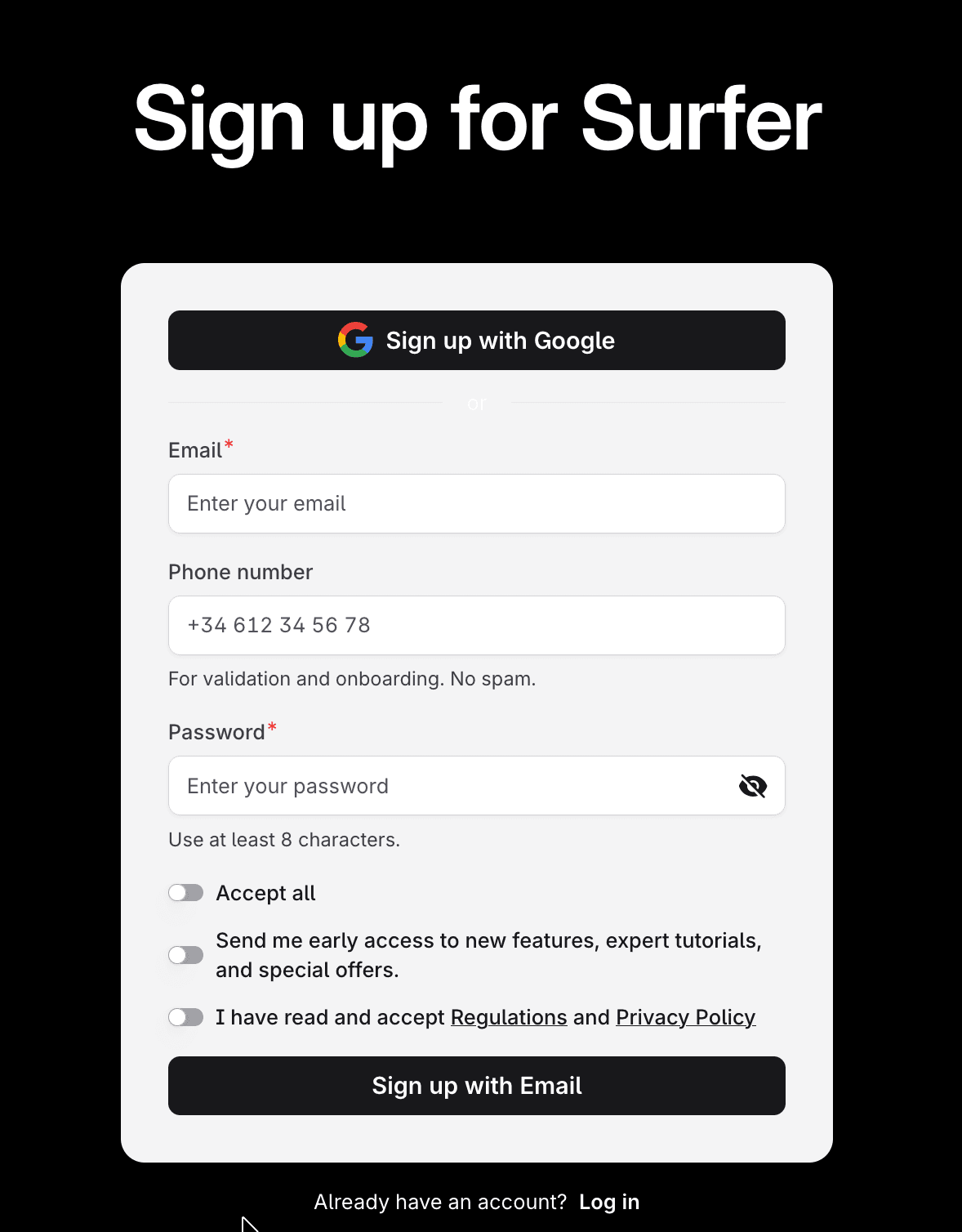
Setting up an account is quick, and the onboarding is deliberately light compared with heavier enterprise SEO suites — a design choice the founders have pointed to as a reason for the tool's early growth. You can register with an email address or use Google Sign-In to skip password creation entirely.
The steps below cover the path from sign-up to your first optimized document.
- Go to the sign-up page and choose "Sign up with Google" or enter your email and a password of at least eight characters.
- Accept the Regulations and Privacy Policy, and optionally opt in to product updates, then confirm your account.
- Select and start a plan from the billing section, choosing monthly or annual billing.
- Connect your primary domain and, if you want performance-driven suggestions, link Google Search Console to enable audits and Topical Map data.
- Install the Google Docs Chrome extension or set up the WordPress or Contentful integration if you publish there.
- Create your first Content Editor by entering a target keyword, then write or paste a draft and follow the live guidelines to raise your Content Score.
New users should budget a little time to learn how to read the recommendations strategically rather than chasing a perfect score, since that judgment is where the tool pays off. The Surfer Academy, certifications, and knowledge base help shorten that curve.
Support and Contact Options
Support combines strong self-service resources with human help whose quality some users describe as uneven. The written and video material is genuinely deep: a searchable knowledge base, the Surfer Academy with structured courses, free masterclasses, certifications, and an active community. Many users report getting productive without ever needing to contact a person. When you do reach out, live chat and email are available on paid plans, and higher tiers add a dedicated customer success manager and personalized onboarding.
The human side draws more mixed feedback. Most reviewers describe support as fast and helpful, but a minority report slow or generic replies, particularly around billing disputes over unused credits. A published response-time commitment is not stated, so expectations are best set by plan level, with the top tiers offering the most accountable help.
| Channel | Details |
|---|---|
| Live chat | Available on paid plans during business hours |
| support@surferseo.com; general customer support Mon–Fri | |
| Knowledge base | Extensive self-service documentation at docs.surferseo.com |
| Academy & community | Courses, certifications, masterclasses, and a user community |
| Dedicated manager | Success manager on "Peace of Mind" and Enterprise plans |
| Social | Active on LinkedIn, Facebook, X, and YouTube |
Surferseo Pros and Cons
Pros
- +Best-in-class Content Editor with real-time optimization scoring.
- +Data-driven recommendations based on top-ranking pages (500+ signals).
- +Integrates directly into Google Docs and WordPress.
- +Fast reports and a clean, beginner-friendly interface.
- +Topic clusters and content audit tools streamline strategy.
Cons
- –Pricey, especially with add-ons like the AI Tracker.
- –Keyword research is weaker than Ahrefs or Semrush.
Frequently Asked Questions
What is Surfer used for?
It is a content optimization and AI visibility platform that analyzes top-ranking pages for a keyword, then gives real-time guidelines to help your content rank in Google and get cited in AI answers from tools like ChatGPT and Perplexity.
Is there a free version of Surfer?
There is no free trial of the main platform. The free Keyword Surfer Chrome extension is available to anyone, and paid plans start at the Discovery tier. Auto-renewal can be switched off at any time.
How much does the platform cost?
Billed annually, the main tiers run €99/month (Standard), €182/month (Pro), and €299/month (Peace of Mind), with a lighter Discovery tier at €49/month and custom Enterprise pricing from €999/month. Monthly billing is higher, and the annual plan is charged upfront.
Does Surfer write content for you?
Yes, through Surfer AI, which generates full SEO-ready drafts from a keyword, plus the Surfy assistant for rephrasing and refining. The output is a strong starting point but reviewers recommend human editing before publishing.
Which AI engines does the AI Tracker monitor?
On the higher tiers it tracks ChatGPT, Google AI Overviews, Google AI Mode, Perplexity, and Gemini, reporting visibility score, share of voice, mention gaps, sentiment, and cited sources.
Is this a full SEO suite like Ahrefs or Semrush?
No. It specializes in content optimization and AI visibility and does not include backlink analysis, technical site audits, or deep rank tracking. Teams needing those typically pair it with a broader suite.
Who owns Surfer?
It was founded in Poland in 2017 and acquired by France's Positive Group in October 2025. The founding team remained with the company after the acquisition.
Does it support languages other than English?
It works with all languages, though users note the strongest results in English and weaker analysis in some others, including Spanish.