
Rev Review: AI and Human Transcription for Legal, Research, and Media Work

Rev Review: AI and Human Transcription for Legal, Research, and Media Work
Rev is a speech-to-text service that converts audio and video into text through two paths in one platform: fast AI transcription and human-verified transcription with a stated 99%+ accuracy guarantee. It serves anyone who needs recordings turned into reliable text, from journalists and researchers to legal teams building case files. What sets Rev apart is that both options live under a single account, so you can run a quick AI draft for internal review and route the same file to human transcriptionists when a record has to hold up in court or in publication.
The company has grown well beyond simple dictation. Rev now positions itself around what it calls an Investigative Intelligence Platform for legal and law enforcement work, where transcripts, police reports, body-cam video, and other evidence become a searchable, citable case record. That focus sharpened after Rev acquired SmartDepo, a deposition-summary tool, in 2025. Alongside the consumer-facing product, Rev runs a developer API (Rev AI) that exposes the same underlying speech recognition to software teams.
This Rev review works through pricing, accuracy, security, features, integrations, apps, and support so you can judge whether it fits your workflow.
Key facts at a glance
| Detail | Information |
|---|---|
| Website | rev.com |
| Developer | Rev (formerly Rev.com) |
| Year founded | 2010 |
| Headquarters | Austin, Texas (with a San Francisco office) |
| Supported platforms | Web, iOS, Android; developer API |
| Free plan / trial | Free plan with 45 AI transcription minutes per month; API offers a one-time credit |
| Core purpose | AI and human transcription, captions, subtitles, and evidence analysis |
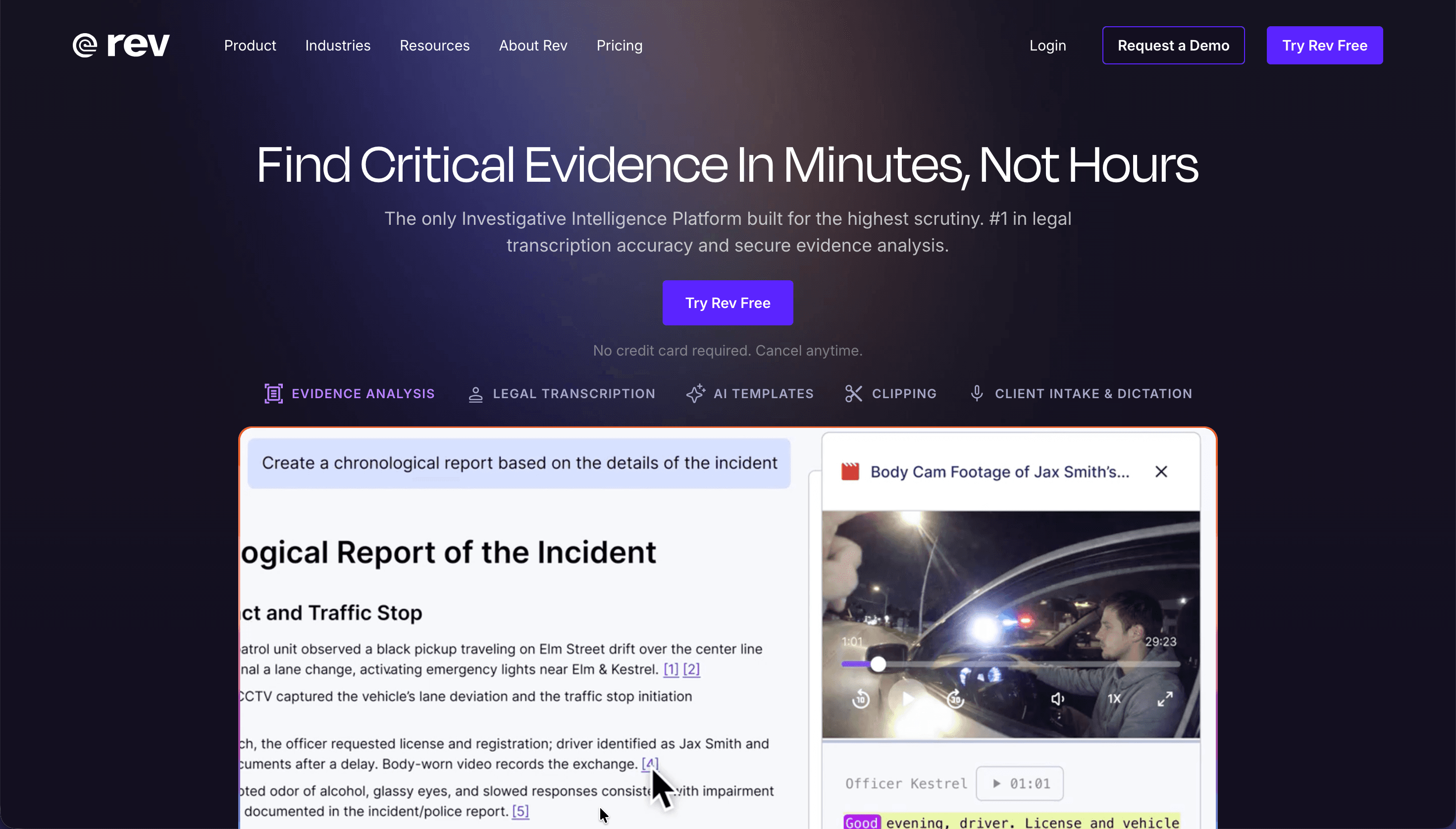
Is Rev Safe and Legitimate?
Rev is an established company, not a fly-by-night service. It was founded in 2010 by a group of MIT alumni and is headquartered in Austin, Texas, with an additional office in San Francisco. Over more than a decade it has processed billions of words of speech and now reports more than one million users, including large law firms and court reporting agencies. It has also been named the first official AI partner of the State Bar of Texas, which speaks to how seriously the legal sector treats its accuracy and security claims.
On the data-protection side, Rev maintains a layered set of controls. Files are encrypted in transit using TLS 1.2 and 1.3, and at rest through Amazon S3 server-side encryption with unique keys. The company states plainly that it does not sell customer data and never uses your recordings to train external large language models, an important distinction given how many AI tools quietly reuse uploaded content. Human transcriptionists are vetted through ID verification and sign non-disclosure agreements before they can access any work.
One point worth understanding before you commit: compliance coverage depends on your plan. HIPAA compliance, which requires signing a Business Associate Agreement, is offered on enterprise plans, and CJIS coverage for criminal-justice data is tied to the top Unlimited tier. Rev also enforces US data sovereignty, meaning customer data is processed and stored within the United States, and it states it will not hand over customer files in response to a subpoena without proper legal process.
| Security parameter | What Rev provides |
|---|---|
| Encryption | TLS 1.2/1.3 in transit; S3 server-side encryption at rest |
| Certifications | SOC 2 Type II; SOC 3 report available; PCI compliant for payments |
| Healthcare data | HIPAA compliance on enterprise plans, with a signed BAA |
| Criminal justice data | CJIS support on the Unlimited plan |
| Privacy regulation | GDPR compliance; no third-party LLM training on your data |
| Access controls | SSO via SAML 2.0, optional MFA, role-based access, domain claiming |
| Data location | Processed and stored within the United States |
User sentiment is mixed in the way most high-volume services are. Positive reviews on G2 and Capterra praise accuracy, speaker separation, and fast turnaround, while some Trustpilot reviewers report frustration with subscription billing and occasional dips in transcript quality on difficult audio. The company is clearly legitimate; the practical caveat is to read the plan details closely, especially around subscription renewals and which compliance tier you actually need.
What Rev Can Do
Rev's feature set spans two accuracy levels and several output types, so the same platform covers a rough internal draft and a court-ready record. Understanding the distinct services helps you match the right tool to each job.
Human transcription is the flagship, guaranteed at 99%+ accuracy for clear audio and delivered in 12 hours or less, with rush options that speed delivery up to five times faster. A Premium tier adds an expert second review that corrects speaker names across long files and can align timestamps to on-screen timecode. AI transcription, built on Rev's proprietary Reverb speech model, delivers 96%+ accuracy on clear audio and can return results in minutes, which suits meeting notes, first-pass interview drafts, and scale work.
Beyond raw transcripts, Rev produces captions and subtitles. English captions and AI captions cover accessibility and engagement needs, while Global Subtitles provide human-translated subtitles in more than 17 languages. For legal and investigative users, the platform layers on evidence analysis: you can search across many files at once to surface admissions or contradictions, pull timestamped clips, and generate summaries, chronologies, and cross-examination outlines through AI templates. A document editor turns those AI outputs into editable, shareable documents with citations linked back to the source file, exportable to PDF or Word.
The certified legal transcription line deserves a separate mention because its service levels are precise. An Instant Rough Draft is AI-generated in roughly 30 minutes; a Human Rough Draft reaches 99% accuracy in three business days; and Ready to Certify delivers court-ready transcripts at 99.6% accuracy within five business days, with standard cover pages and formatting.
| Service | Accuracy | Typical turnaround |
|---|---|---|
| AI transcription (Reverb) | 96%+ on clear audio | Minutes |
| Human transcription (Standard) | 99%+ guaranteed | 12 hours or less; rush available |
| Human Rough Draft (legal) | 99% | ~3 business days |
| Ready to Certify (legal) | 99.6% | ~5 business days |
| Instant Rough Draft (legal) | AI-generated | ~30 minutes |
Rev Pricing and Plans
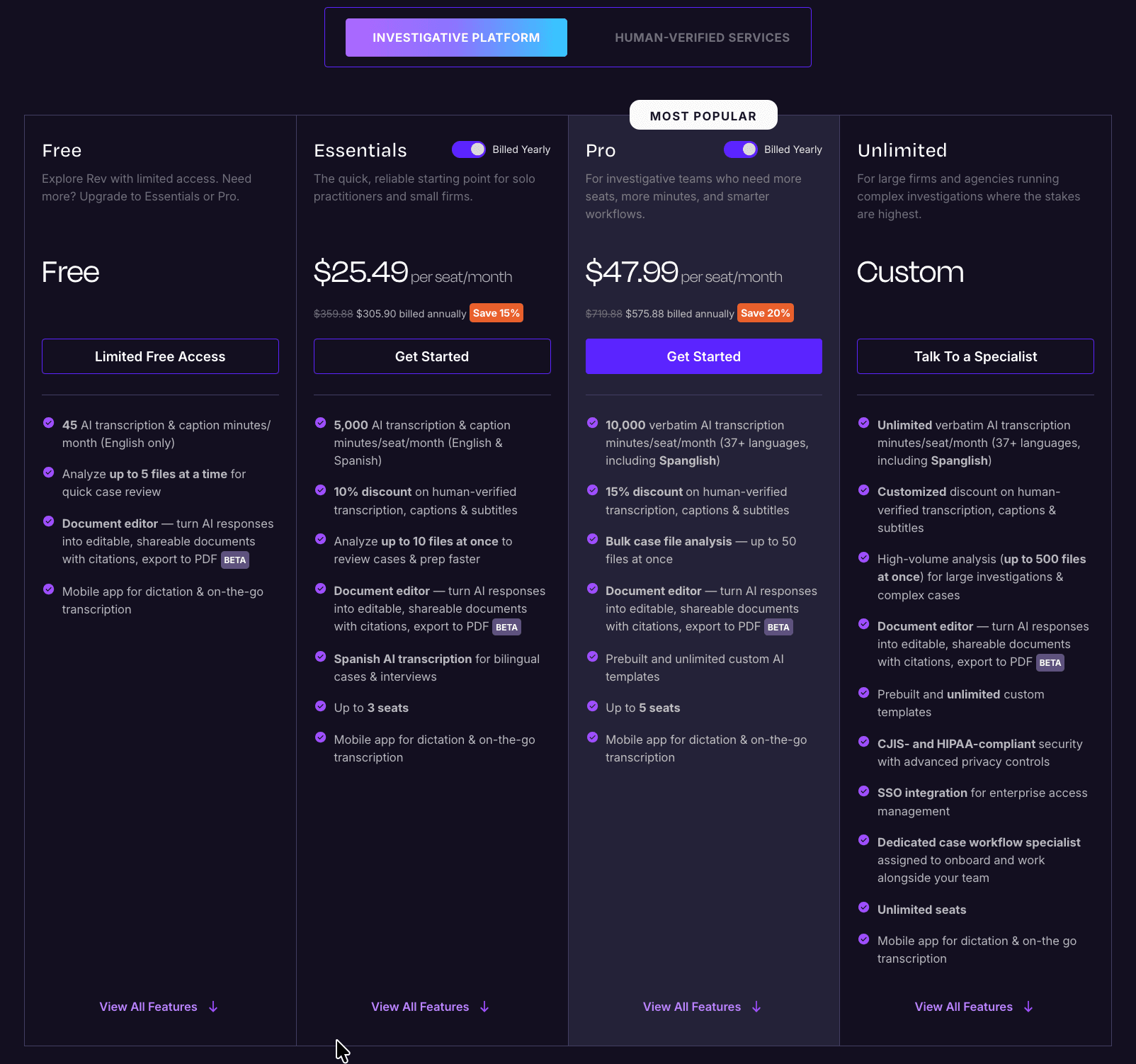
Rev pricing has more moving parts than most transcription services, which is worth knowing before you compare it to alternatives. There are essentially two ways to pay: subscription plans priced per seat, or pay-per-minute rates with no subscription. On top of that, subscribers receive discounts on human transcription, and captions and subtitles carry their own separate rates.
The subscription tiers run from a free plan up to a custom Unlimited plan. The free plan includes 45 AI transcription and caption minutes per month in English, plus the ability to analyze up to five files at once and the document editor, which makes it a genuine way to evaluate the platform rather than a token trial. Paid plans add far larger minute allowances, more languages, and higher discounts on human work. Prices below reflect annual billing, with monthly billing running higher.
| Plan | Price (billed annually) | AI minutes / seat / month | Languages | Human transcription discount | Notable limits |
|---|---|---|---|---|---|
| Free | $0 | 45 | English only | None | Analyze up to 5 files at once; 1 user |
| Essentials | $25.49/seat/month ($29.99 monthly) | 5,000 | English & Spanish | 10% (annual) | Up to 3 seats; analyze up to 10 files at once |
| Pro | $47.99/seat/month ($59.99 monthly) | 10,000 | 37+ languages, incl. Spanglish | 15% (annual) | Up to 5 seats; bulk analysis up to 50 files; custom AI templates |
| Unlimited | Custom | Unlimited | 37+ languages | Custom | Unlimited seats; up to 500 files at once; CJIS & HIPAA; SSO |
If you prefer to pay only when you use it, pay-per-minute rates apply without any subscription. AI transcription and AI captions cost $0.25 per audio minute, and human transcription costs $1.99 per audio minute with no surcharge for multiple speakers, accents, or difficult audio. Captions and subtitles are priced separately, and the gap between English captions and translated subtitles is significant, so budget accordingly if you publish multilingual video.
| Pay-per-minute service | Price |
|---|---|
| AI transcription / AI captions | $0.25 per audio minute |
| Human transcription | $1.99 per audio minute |
| English captions | $1.99 per video minute |
| Spanish captions | $3.25 per video minute |
| Global subtitles (translated) | $6.49–$15.99 per video minute, by language |
Subscriber discounts on human transcription stack by plan and billing cycle: roughly 3% on monthly Essentials and 10% on annual Essentials, 5% on monthly Pro and 15% on annual Pro, with custom discounts on Unlimited. The practical takeaway is that light users under a few hours a month can live on the free plan, moderate users are usually cheaper on Essentials than paying per minute, and high-volume or multilingual teams should look at Pro or a negotiated Unlimited contract.
Integrations and API
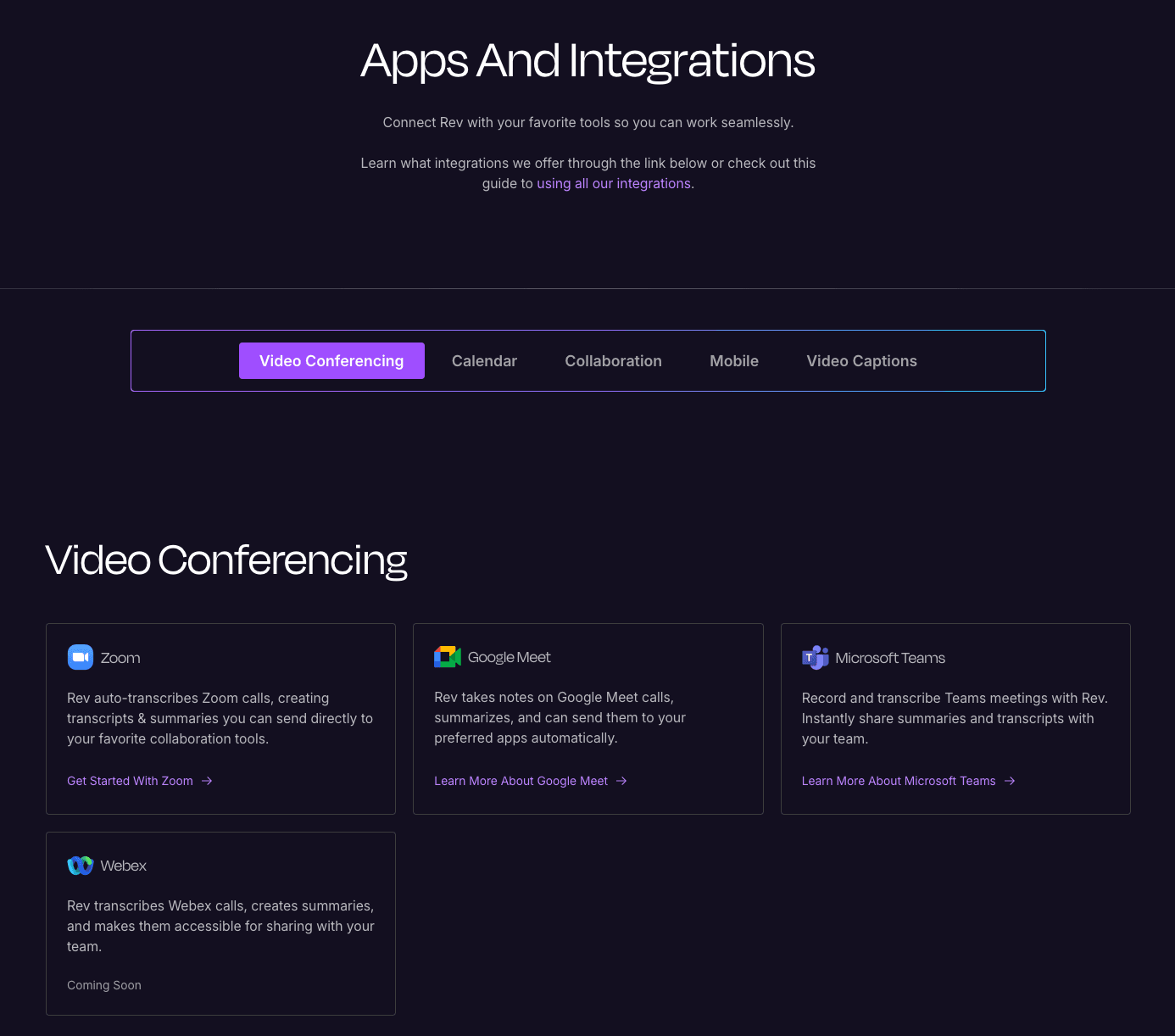
Rev fits into common meeting and productivity stacks rather than asking you to work only inside its own interface. Its AI Notetaker can automatically join and record calls on Zoom, Google Meet, Microsoft Teams, and Webex, then produce live transcripts and post-call summaries with decisions and action items. Calendar and workflow connections round this out, so recordings and notes land where your team already works.
Native integrations reported across Rev's own pages and third-party listings include Zoom, Google Meet, Microsoft Teams, Webex, Google Calendar, Microsoft Outlook, Slack, Google Drive, and Dropbox, along with video platforms such as YouTube, Vimeo, Brightcove, Kaltura, and Panopto. The Webex connection has been listed as coming soon, so confirm current availability if that one matters to you.
For developers, Rev AI is a separate API-first product that exposes the same speech technology. It offers an asynchronous API for pre-recorded files and a streaming API over WebSocket for real-time captions, with speaker diarization for up to eight speakers included by default. Coverage extends to 57+ languages for asynchronous jobs, and the API adds insight features such as language identification, sentiment analysis, and topic extraction. There are official SDKs for Python, Node.js, and Java, output in JSON, plain text, SRT, and VTT, and a one-time free credit to test the service. Rev AI has also partnered with Recall.ai, whose unified meeting-bot API lets developers pull Rev transcription from multiple conferencing platforms without building each integration separately.
Platforms and Apps
Rev is available on the web and through free mobile apps for iOS and Android, and files sync across devices so a recording captured on a phone appears in your account on the desktop. The core service runs in the browser, where you upload files, edit transcripts, manage workspaces, and handle billing and plan changes.
The mobile app is built for capture and review on the move, which suits reporters in the field, researchers running interviews, and legal professionals dictating case notes. It records high-quality audio using the device or an external microphone, shows a live AI transcript as you speak, and lets you add bookmarks to mark key moments. From a saved recording you can order an AI transcript, AI captions, or a human transcript, and you can highlight, edit, and chat with transcripts to surface quotes and action items. Two limits are worth noting: the app cannot record phone calls, and account and subscription changes must be made through the website rather than the app.
Getting Started With Rev
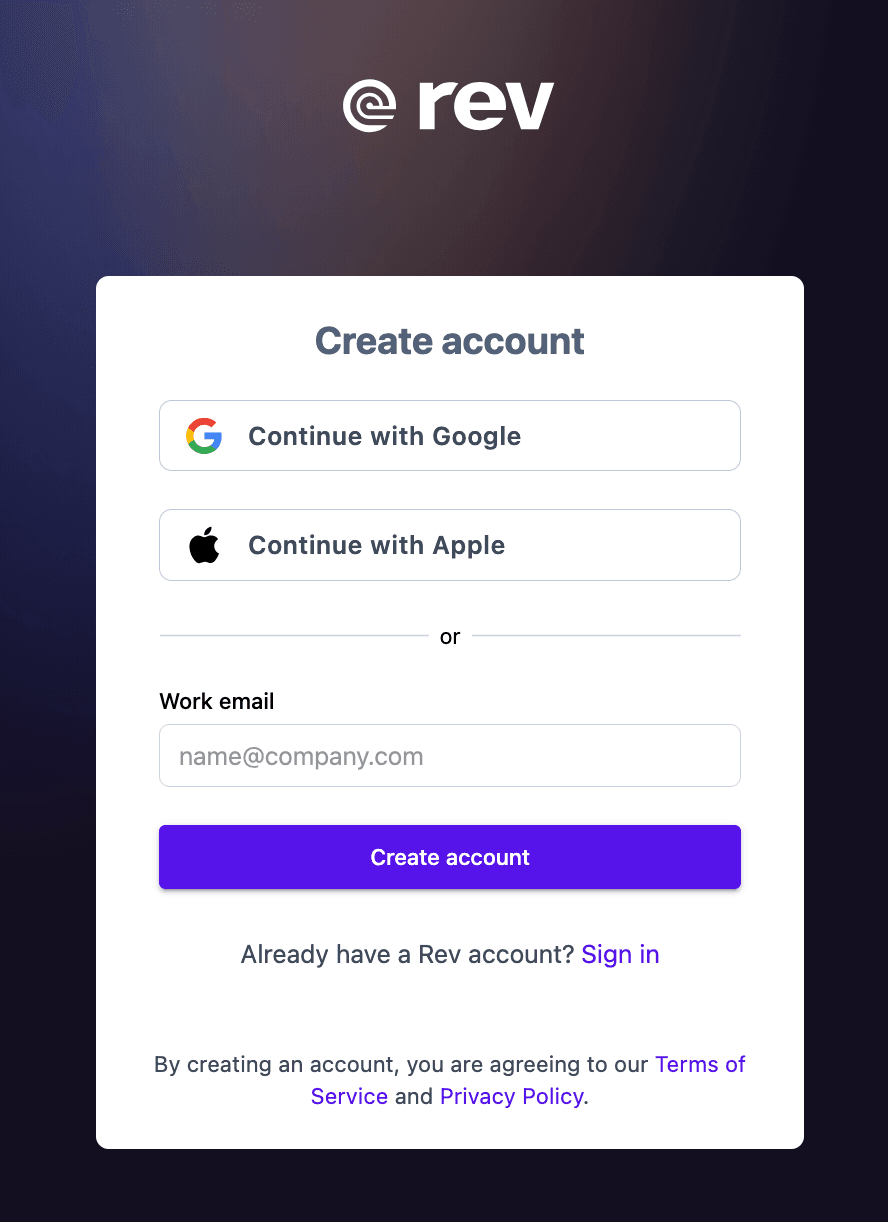
Creating a Rev account takes only a few steps, and the free plan means you can try the platform before paying anything. The sign-up screen offers social login or a standard email registration.
- Go to rev.com and choose "Try Rev Free" or "Create account."
- Sign up with "Continue with Google," "Continue with Apple," or enter your work email and select "Create account." No credit card is required to start.
- Agree to the Terms of Service and Privacy Policy to finish creating the account.
- Upload an audio or video file, or record directly in the mobile app.
- Choose your output: an AI transcript, AI captions, or a 99%+ human transcript, and add options like speaker names, timestamps, or rush delivery.
- Review and edit the finished transcript in the browser editor, then export or share it with your team.
Support and Contact Options
Rev handles help primarily through self-service and chat rather than a 24/7 phone line, which is common for a product at this scale. The help center covers ordering, editing, billing, integrations, and security, and an in-app chat widget sits in the bottom-right corner of the support pages for direct questions.
| Channel | Details |
|---|---|
| Help center | Searchable knowledge base at support.rev.com covering setup, orders, billing, and security |
| Live chat | Chat widget available on the support site |
| Email / requests | Submit a request through the support site; security questions go to the security and compliance team |
| Security contact | Dedicated security and compliance address for privacy and data questions |
| Enterprise support | Sales-assisted onboarding and a dedicated workflow specialist on the Unlimited plan |
Enterprise and Unlimited customers get more hands-on help, including a dedicated case workflow specialist assigned to onboard the team. For everyday users, the combination of documentation and chat resolves most questions, though some reviewers have noted that billing and cancellation issues can take longer to sort out than they'd like.
Rev Pros and Cons
Pros
- +Hybrid model: fast AI drafts or up to 99% human accuracy.
- +Human transcription handles accents, jargon, and multiple speakers well.
- +Transparent per-minute pricing ($0.25 AI, $1.99 human).
- +Quick turnaround, even on large or long files.
- +SOC 2 and GDPR compliant; meeting assistant for Zoom/Teams/Meet.
Cons
- –Human transcription gets expensive for long files.
- –Limited free plan (only ~45 min of AI per month).
- –AI struggles with noisy audio, accents, and drops unclear words.
Frequently Asked Questions
Is Rev good for legal and court work?
Yes. Rev is built with a strong legal focus, offering certified transcription tiers up to 99.6% accuracy, evidence analysis tools, and CJIS and HIPAA compliance on higher plans. It is the first official AI partner of the State Bar of Texas.
How accurate is the transcription?
Human transcription is guaranteed at 99%+ for clear audio, while AI transcription reaches 96%+ on clear audio. Accuracy drops with heavy background noise, overlapping speakers, or strong accents, where human review is the safer choice.
Does the service offer a free option?
There is a free plan that includes 45 AI transcription and caption minutes per month in English, along with file analysis and the document editor. The developer API also provides a one-time free credit.
How much does human transcription cost?
Human transcription is $1.99 per audio minute with no extra charge for multiple speakers, accents, or difficult audio. Subscribers save between roughly 3% and 15% depending on their plan and billing cycle.
Which languages does Rev support?
AI transcription covers 37+ languages on the Pro plan (and 57+ through the developer API), while human transcription centers on English. Translated subtitles are available in more than 17 languages.
Can I use Rev on my phone?
Yes. Free iOS and Android apps let you record, view live transcripts, bookmark moments, and order transcripts, with files syncing to your account. The app cannot record phone calls, and plan changes must be made on the website.
Will my data be used to train AI models?
No. Rev states it does not sell customer data and never uses your recordings to train external large language models. Data is encrypted in transit and at rest and stored within the United States.
How is Rev different from Otter?
Both convert speech to text, but Rev uniquely offers AI and human transcription from one interface and leans heavily into captions, subtitles, and legal evidence workflows, whereas Otter is AI-only and focused on real-time meeting notes.