
NordPass Review: Features, Security, and Pricing Explained
What Is NordPass and Who Is It For
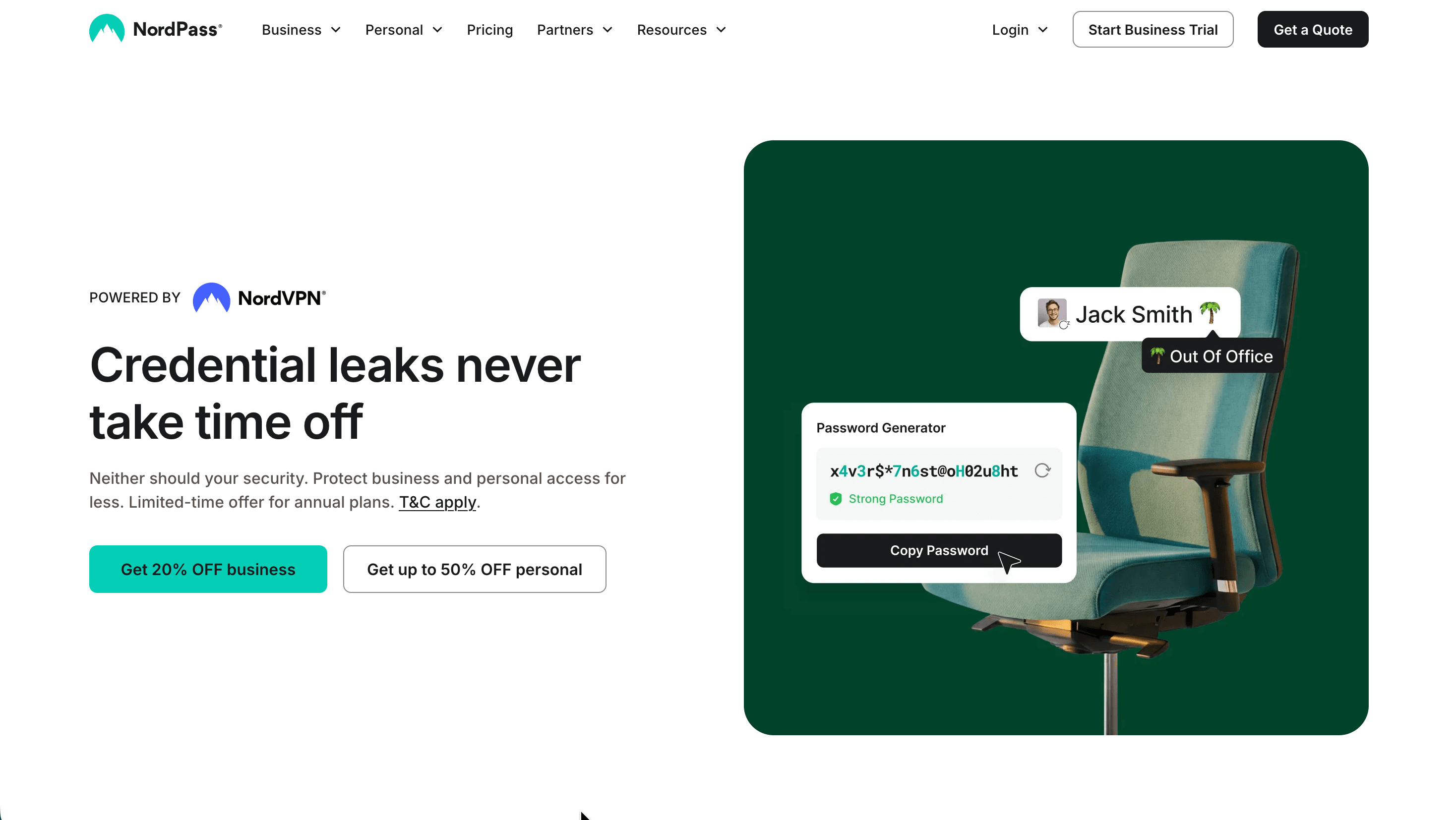
NordPass is a password manager built by Nord Security, the company behind NordVPN, and it launched in 2019. It stores passwords, passkeys, credit cards, secure notes, personal information, and files inside a single encrypted vault that syncs across your devices, then autofills those details when you log in or check out online. The tool is split into two clear directions: a personal line for individuals and households, and a business line for teams and larger organizations. This NordPass review looks at both.
The service suits a wide range of users. Individuals who want to stop reusing weak passwords get a capable free tier and inexpensive upgrades. Families can cover up to six people under one subscription. Companies that need to share credentials without exposing them, enforce password rules, and monitor account activity get a dedicated set of admin tools. Because NordPass is available on every major operating system and browser, it fits people who move between a phone, a laptop, and a work machine throughout the day.
The table below summarizes the essentials before the deeper chapters.
| Detail | Information |
|---|---|
| Website | nordpass.com |
| Developer | Nord Security (creators of NordVPN) |
| Launched | 2019 |
| Supported platforms | Windows, macOS, Linux, Android, iOS, and browser extensions for Chrome, Firefox, Edge, Brave, Opera, and Safari |
| Free plan | Yes, unlimited passwords on one active device; 30-day Premium trial for new accounts |
| Main purpose | Securely generate, store, autofill, and share passwords and other sensitive data |
Is NordPass Safe and Legitimate
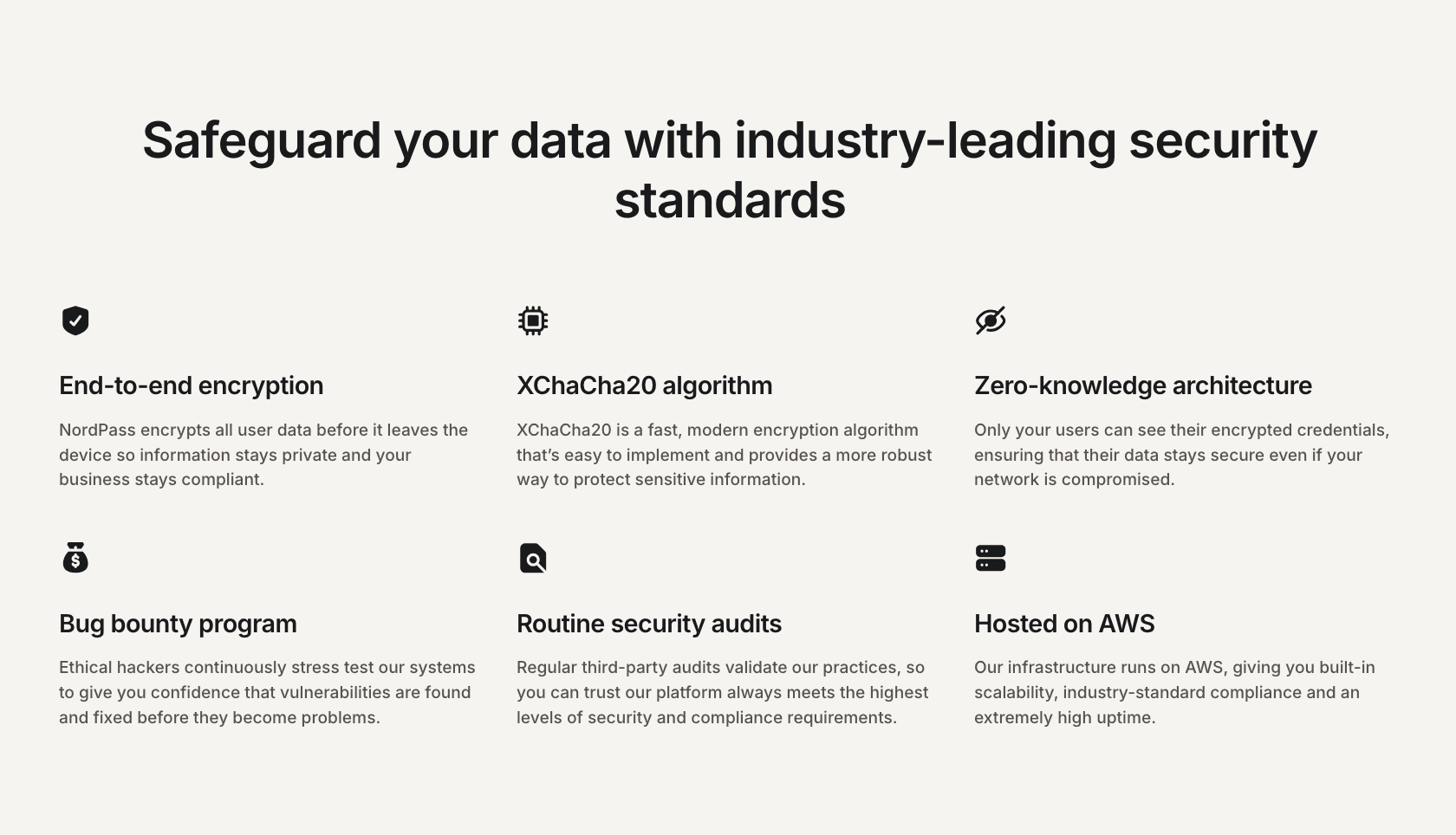
NordPass is a legitimate product from an established security vendor, and its protection model is built around a few well-defined choices. All vault data is encrypted on your device before it ever reaches the cloud, using the XChaCha20 algorithm rather than the more common AES-256. Keys are derived locally with Argon2, which strengthens resistance to brute-force attempts against a stolen vault copy. The company operates on a zero-knowledge basis, meaning the decryption key stays with you and NordPass staff cannot read your stored items.
Independent scrutiny backs these claims. The German security firm Cure53 first audited the desktop, mobile, and browser clients in early 2020 and found the cryptographic design sound, with only minor issues that were fixed; a separate audit later covered the business edition, and the company has continued to commission reviews since. On the business side, NordPass holds ISO/IEC 27001 certification and has passed the SOC 2 Type 2 audit, and it meets the objectives of the HIPAA Security Rule. A bug bounty program invites external researchers to probe the systems continuously, and the infrastructure runs on AWS.
Two honest caveats belong in any fair assessment. NordPass is closed source, so the client code cannot be inspected line by line the way an open-source competitor allows; users rely on the vendor and its auditors rather than public verification. And the zero-knowledge design has a hard edge: if you forget your master password and have neither a recovery code nor biometric unlock enabled, the vault cannot be restored and its contents are lost. There are no known breaches of NordPass itself. On Trustpilot the service carries a score around 4.0 out of 5 across roughly two thousand reviews, with a large share of five-star ratings, many of which single out fast, patient support agents by name.
| Security parameter | Detail |
|---|---|
| Encryption | XChaCha20 with Argon2 key derivation |
| Architecture | Zero-knowledge; data encrypted on-device |
| Independent audit | Cure53 (from 2020, repeated since) |
| Certifications | ISO/IEC 27001, SOC 2 Type 2, HIPAA objectives |
| Additional measures | Bug bounty program, routine third-party audits, AWS hosting |
| Account recovery | Recovery code or biometrics; no vendor backdoor |
Core Features and What They Do
At its center NordPass generates strong passwords, saves them automatically as you create accounts, and fills them back in across sites and apps. The built-in generator can produce random character strings or memorable word-based passphrases, which are easier to type on devices where copy-paste is awkward. Beyond passwords, a single vault holds passkeys, credit cards, secure notes, personal information, and file attachments, with 3GB of storage reserved for files on paid personal plans.
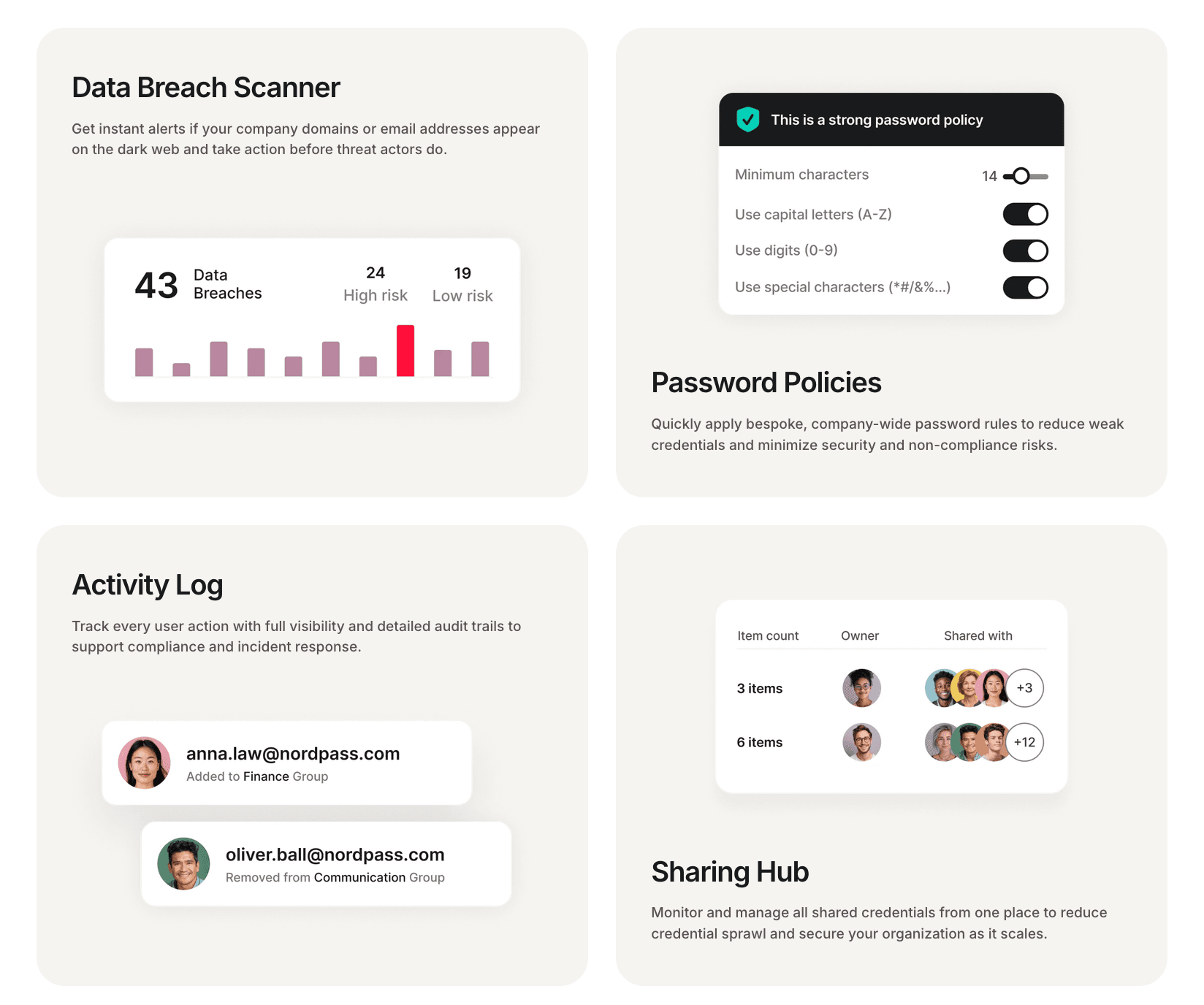
Several tools extend the vault into active protection. Password Health flags weak, reused, or aging credentials so you can fix them, and the Data Breach Scanner checks whether your email addresses or card details have surfaced in known leaks and alerts you when they do. Email Masking generates disposable aliases so you can sign up for services without exposing your real address, which reduces spam and phishing exposure. A built-in authenticator stores TOTP two-factor codes alongside the matching login, removing the need for a separate app. Emergency Access lets a trusted contact reach your passwords and secure notes after a fixed seven-day waiting period.
For organizations, the feature set shifts toward oversight and control. Password Policies let an administrator enforce company-wide rules, such as a minimum character count and required character types, so weak credentials are curbed at the source. An Activity Log records user actions with detailed audit trails for compliance and incident response, and the Sharing Hub gives a single view of every shared credential, who owns it, and who it reaches. Group-based and folder-based sharing move credentials to the right people without revealing the underlying passwords.
NordPass Pricing and Plans
NordPass pricing separates personal and business tiers, and both use introductory rates that renew at higher prices when the first term ends. All plans carry a 30-day money-back guarantee, prices exclude VAT, and the longest terms carry the deepest discounts. The free personal plan runs indefinitely and, unusually, places no limit on the number of passwords, passkeys, or notes you store; its main restriction is that you can stay logged in on only one device at a time, and advanced tools such as breach scanning and multi-device sync require an upgrade. New accounts also get a 30-day taste of Premium.
The personal side offers Premium for one user and Family for up to six, each member receiving a fully separate, private vault plus a shared vault for household credentials. On the business side, Teams targets small groups, Business adds folder and group sharing plus organization-wide breach monitoring, and Enterprise layers on identity-provider integration, provisioning, and SIEM connections. A useful detail for mixed use: every paid business seat includes a free NordPass Premium personal account.
| Plan | Introductory price | Users | Key inclusions |
|---|---|---|---|
| Free (Personal) | €0 | 1 | Unlimited passwords, generator, autosave/autofill, MFA; one active device |
| Premium | from about €1.49/mo (2-year) | 1 | Everything in Free plus Data Breach Scanner, Password Health, Email Masking, Emergency Access, file storage, unlimited device sync |
| Family | from about €2.79/mo (2-year) | up to 6 | Full Premium features for each of six separate vaults plus a shared vault |
| Teams (Business) | €1.79 per user/mo (2-year) | 10-user pack | Password generation, safe sharing, offline access, activity monitoring, MFA, SSO with Google Workspace |
| Business | €3.59 per user/mo (2-year) | 5 minimum | Everything in Teams plus group and folder sharing, password strength monitoring, data breach monitoring, Vanta compliance integration |
| Enterprise | €5.39 per user/mo (2-year) | 5 minimum | Everything in Business plus SSO with Entra ID/MS ADFS/Okta, automatic provisioning, Microsoft Sentinel and Splunk integrations, dedicated support |
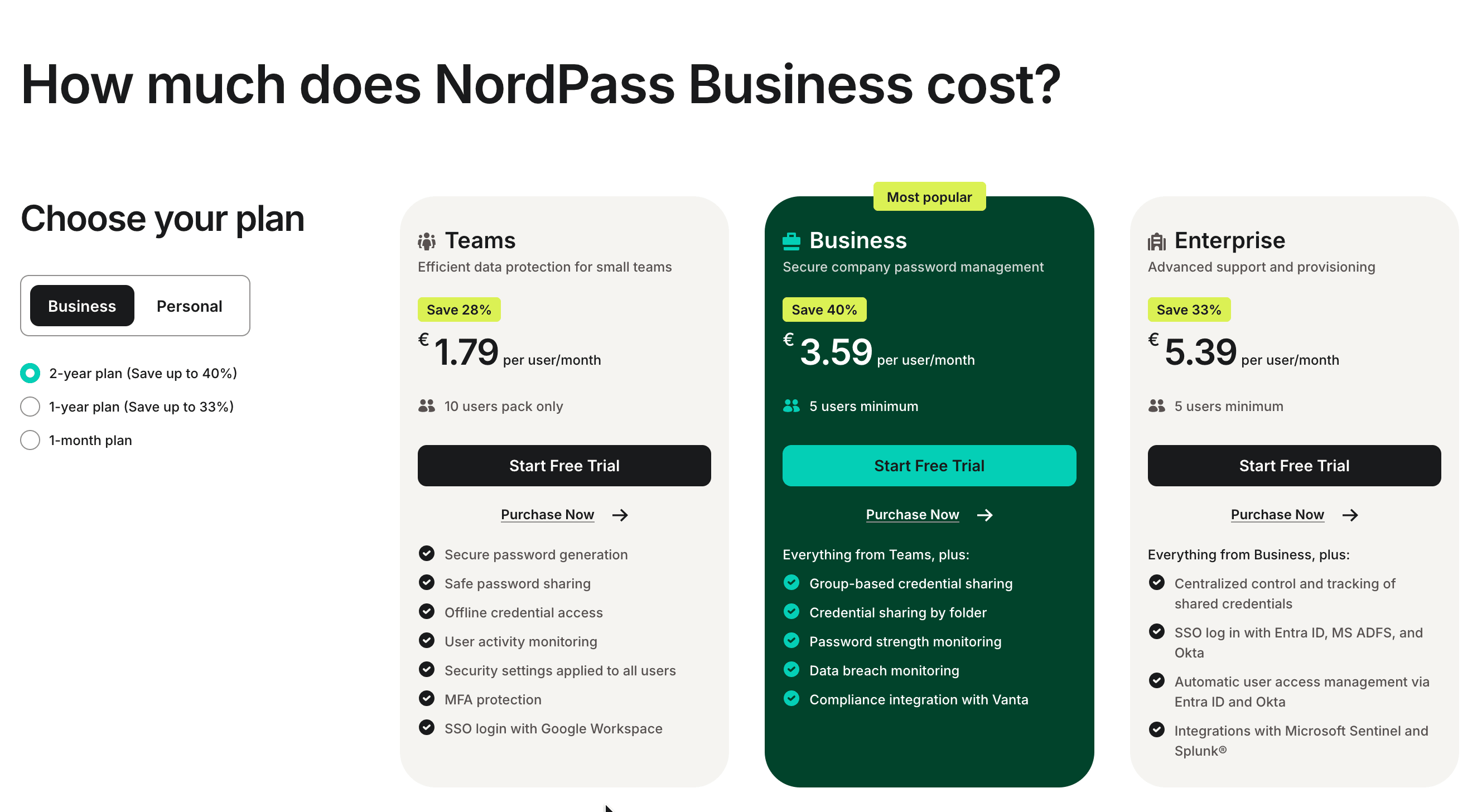
A few conditions are worth planning around. Business scales at a flat per-seat rate up to 250 users, with no volume discount, and organizations above that contact sales for custom pricing. The introductory discount ends when the initial term does, and renewals apply the plan's standard rate, which is higher and not published as an exact figure, so long-term budgeting benefits from anticipating the step-up. Teams supports SSO only through Google Workspace; SSO with Okta, Entra ID, or ADFS begins at Enterprise regardless of team size. NordPass Business offers a 14-day refund window, while personal plans use the 30-day guarantee. Payment options are broad, spanning major cards, PayPal, Amazon Pay, Google Play, and cryptocurrency.
Integrations and Compatibility
For everyday users the important integrations are the browser extensions that drive autofill and autosave, available across Chrome, Firefox, Edge, Brave, Opera, and Safari. The built-in authenticator also reduces reliance on third-party 2FA apps by keeping one-time codes next to the credentials they unlock. Businesses gain a deeper set of connections that grow with the plan.
Identity and provisioning integrations are the backbone of the business tiers. Teams connects to Google Workspace for single sign-on, while Enterprise adds SSO with Microsoft Entra ID, MS ADFS, and Okta, along with automatic user provisioning through Entra ID and Okta using SCIM. One practical consideration: to preserve zero-knowledge architecture, SCIM group provisioning requires deploying a separate client-side Encryption Service on your own cloud infrastructure, and once SCIM is active, user and group management moves to your identity provider rather than the NordPass admin panel.
Compliance and monitoring integrations round out the picture. NordPass connects to Vanta through an API to align the password manager with compliance workflows starting on the Business plan. At Enterprise, the Activity Log API exposes audit records programmatically, and native integrations push real-time activity into Microsoft Sentinel and Splunk for security teams that centralize their logs.
| Integration | Availability |
|---|---|
| Browser extensions (Chrome, Firefox, Edge, Brave, Opera, Safari) | All plans |
| Google Workspace SSO | Teams and above |
| Entra ID, MS ADFS, Okta SSO | Enterprise |
| SCIM provisioning (Entra ID, Okta) | Enterprise |
| Vanta compliance API | Business and above |
| Activity Log API, Microsoft Sentinel, Splunk | Enterprise |
Platforms and Apps
NordPass runs natively on Windows, macOS, and Linux for desktops, and on Android and iOS for mobile, with the browser extensions covering the web workflow where most people spend their time. The vault syncs across these devices so passwords, passkeys, cards, and notes travel with you, and cached local copies allow offline access when there is no connection. The free plan works on any of these platforms but keeps you logged in to just one active device at a time, while paid plans remove that limit.
Functionality is broadly consistent across versions, with a few sensible differences. Mobile apps add biometric unlock through Face ID or fingerprint, autosave and autofill within apps, and email mask management, and recent iOS updates brought autosave and a quicker path to the password generator during sign-up. Reviewers note that the browser extension carries slightly more day-to-day depth than the desktop app, and occasional autofill quirks appear on some sites and in some mobile reviews. Setup on mobile routes you through a browser to authenticate your Nord Account, then back into the app to enter your master password and enable biometrics.
How to Get Started With NordPass
Creating an account and reaching a working vault takes only a few minutes. The steps below reflect the standard flow.
- Sign up at nordpass.com using your email address, or through Google or Apple single sign-on, and verify the account from the confirmation email.
- Create a strong master password. This is the one password you must remember, since it unlocks the vault and is never stored on NordPass servers.
- Generate and safely store your Recovery Code, a unique 24-symbol code that is the only way to reset a forgotten master password, alongside enabling biometric unlock where available.
- Install the desktop or mobile app and add the browser extension for your main browser to switch on autofill and autosave.
- Import existing passwords from a browser or another manager using a CSV file, or add items manually, and organize them into folders.
- Run Password Health to replace weak or reused credentials, and turn on the Data Breach Scanner and Emergency Access if you are on a plan that includes them.
Support and Contact
NordPass leans on written support channels rather than phone lines, and it keeps them open around the clock. Live chat begins with a chatbot that gathers your name, account email, and account type before handing off to a human agent, and independent testers report connecting to a person within about a minute. Email support handles account-specific and billing matters, typically replying within several hours. A detailed help center and setup guides cover most common questions, and the company also responds through its social channels.
| Channel | Details |
|---|---|
| Live chat | 24/7, available to free and paid users; starts with a chatbot, then a human agent |
| support@nordpass.com; account, billing, and troubleshooting; replies usually within hours | |
| Help center | Searchable articles, setup walkthroughs, and troubleshooting guides |
| Social media | Support and updates via X and Facebook |
| Phone | Not offered |
NordPass Pros and Cons
Pros
- +Future-proof XChaCha20 encryption and zero-knowledge architecture.
- +Clean, intuitive interface that's great for beginners.
- +Generous free plan with unlimited password storage and sync.
- +Affordable premium tiers, cheaper than 1Password.
- +Useful extras: breach scanner, email masking, password health.
Cons
- –Free plan limits you to one active device at a time.
- –Fewer advanced features than 1Password (no Travel Mode).
Frequently Asked Questions
Is NordPass safe to use?
Yes. It encrypts data on your device with XChaCha20 before syncing, follows a zero-knowledge model so staff cannot read your vault, and has passed independent Cure53 audits along with ISO 27001 and SOC 2 Type 2 certifications on its business tier.
Does the password manager have a free plan?
Yes, and it is unusually generous. The free tier stores unlimited passwords, passkeys, and notes and includes the generator, autosave, and autofill, with the main limit being one active device at a time. New accounts also receive a 30-day Premium trial.
How much does NordPass cost?
Personal Premium starts around €1.49 per month on the two-year term and Family around €2.79 per month for up to six users. Business tiers run €1.79, €3.59, and €5.39 per user per month for Teams, Business, and Enterprise on the two-year plan. Introductory rates renew higher.
What happens if I forget my master password?
You can reset it with your Recovery Code, or through biometrics if you enabled them. Without either, the zero-knowledge design means the vault cannot be recovered and its contents are permanently lost, so save the recovery code as soon as you create the account.
Which devices and browsers are supported?
The apps run on Windows, macOS, Linux, Android, and iOS, with extensions for Chrome, Firefox, Edge, Brave, Opera, and Safari. The vault syncs across all of them, and paid plans allow unlimited simultaneous devices.
Can teams and companies use it?
Yes. The Teams, Business, and Enterprise plans add password policy enforcement, activity logs, shared folders and groups, breach monitoring, and, at higher tiers, SSO and provisioning through Entra ID, Okta, and Google Workspace.
Does it integrate with identity providers?
Google Workspace SSO is available from the Teams plan, while Entra ID, MS ADFS, and Okta SSO plus SCIM provisioning are Enterprise features. Vanta compliance integration is available from the Business plan.
Is there phone support?
No. Support is handled through 24/7 live chat, email, a help center, and social channels, which the company says allows clearer step-by-step guidance than a phone call.